Dental Scribe icon Soulware Dental Scribe

AI that charts like your best assistant — built by a dentist.

Voice treatment and perio charting for Open Dental. Chart existing, planned and referred treatment naturally.

Perio charting

The simple problem, priced right.

Speak probing measurements, recession, bleeding, mobility, etc. Dental Scribe fills in the chart, while keeping you on track with innovative, optional visual and audio feedback. Easily plan SRP based on findings, press Save, and it all goes into Open Dental instantly.

$49 a month, or free with treatment charting.

Treatment charting

The hard problem, solved.

Speak the existing, planned, and referred treatment naturally. Dental Scribe uses the latest AI voice models, along with your customized defaults, to identify all the correct treatment and codes. Treatment appears on screen as you speak. Correct it by voice or with the mouse. When it looks good, send it to Open Dental in one click.

$149 a month, perio included.

Chart notes

On the roadmap.

Download Watch the demo Windows · Free trial · No card What you need, and how it connects to Open Dental

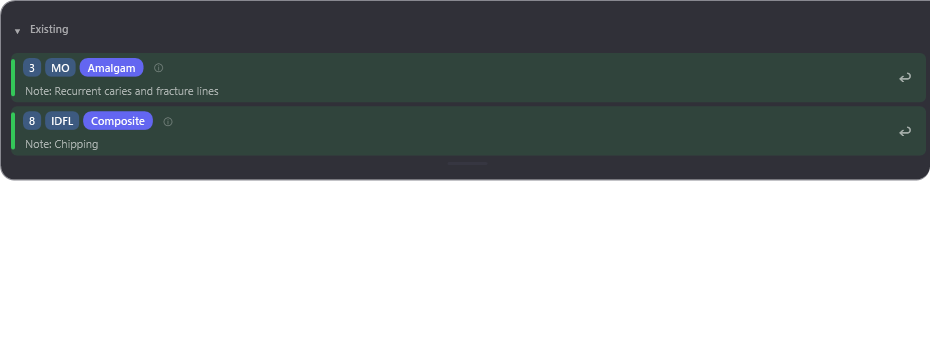
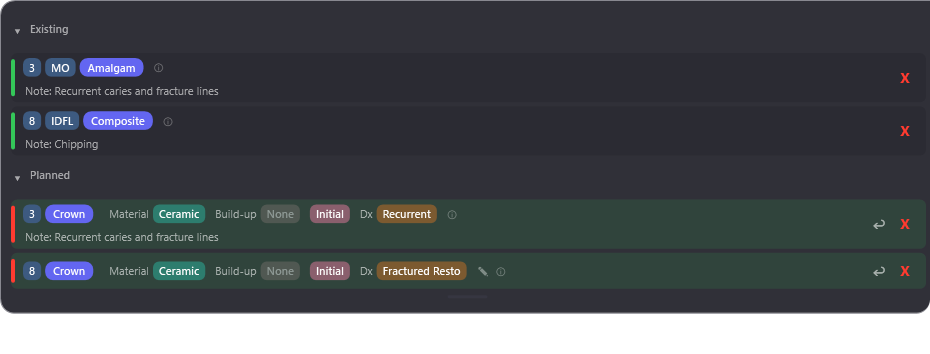
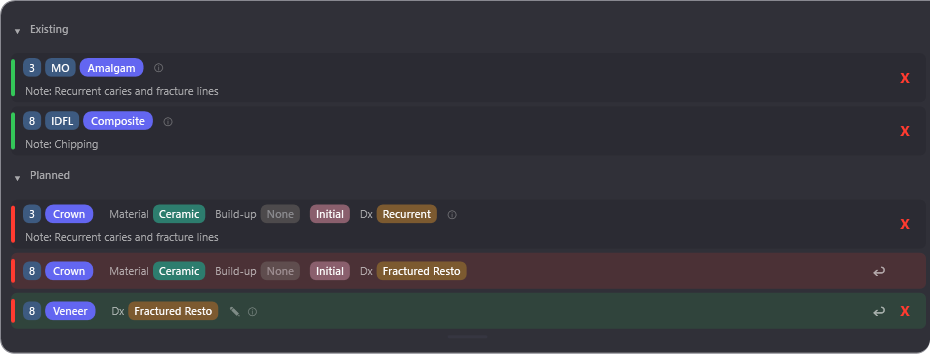
“#3 has an MO amalgam with recurrent caries and fracture lines, and #8 has a DIFL composite that’s chipping.”

“Let’s replace both of those with crowns.”

“Actually — let’s do a veneer on #8 instead.”

The HUD after three sentences: two existing findings, a planned crown on 3, the crown on 8 struck through in red and a veneer on 8 in green

There are plenty of AI tools that write notes. Charting stayed manual — or worse, became a voice command language: rigid phrases, exact orders, working around the software’s rules.

That’s because charting is the hard problem. A crown isn’t just a crown — it’s the build-up, the material, the companion codes, your office’s defaults. Solving that takes dental software built by a dentist.

Dental Scribe was built by a practicing dentist. It’s charting, solved.

How it works

Three simple steps

1

Start Dental Scribe from the patient’s chart — one click, and it’s listening.

One click at the top of the chart. One second to load. No separate app to find. Dental Scribe is a slim, always-on-top banner, so you can even chart while looking at X-rays, intraoral scans, or the patient’s chart.

2

Talk the way you already talk to your assistant.

Treatments appear on screen as they are recognized, applying your defaults like your best assistant. Dental Scribe remembers everything you said and charted so far. Imagine charting a mouthful of amalgams, then saying “let’s replace all those amalgams with composites” and getting a dozen perfectly planned restorations. Or say “crown all those root canaled teeth, but we won’t need cores” and get multiple crowns planned with all the correct codes. Keep the display slim, showing only what was just said, or expand it to show the whole plan. Every row is live: click a tooth, surface, or material to change it, or just say the correction.

3

Submit to Open Dental with one final click.

Once you’re done, click the green arrow and Dental Scribe fills in all the CDT codes for the treatments and pushes them to Open Dental, with diagnoses fields, notes fields, and all companion codes.

Fits the day you already have

No workflow to adopt. No “right way” to roll it out. There are several different paths to start integrating Dental Scribe into your workflow.

Simply use it to chart existing work — a new patient’s mouth charted in less than a minute while waiting for the doctor, instead of yesterday’s endless clicks back and forth between the X-rays and the chart.

Keep your existing flow — even if the assistant still prefers to write down treatment on paper and enter it later, Dental Scribe makes that later data entry a breeze.

Get the plan done before you even walk in — review X-rays and intraoral scans at your desk, dictate the bulk of the plan in the comfort of your office, leaving you more time to connect with the patient.

Or go fully live — use an ambient operatory mic or a wireless lapel mic, charting during the exam itself.

Same product in every case. Start small; go as deep as your office wants.

Your office, your rules

There’s no generic prompt underneath, forcing you to adapt to someone else’s idea of how you should chart. Dental Scribe knows your customized catalog intricately, and syncs your diagnoses list from Open Dental. Dental Scribe’s intelligence is then dynamically built from both of these, allowing it to chart like the assistant who’s been with you for years.

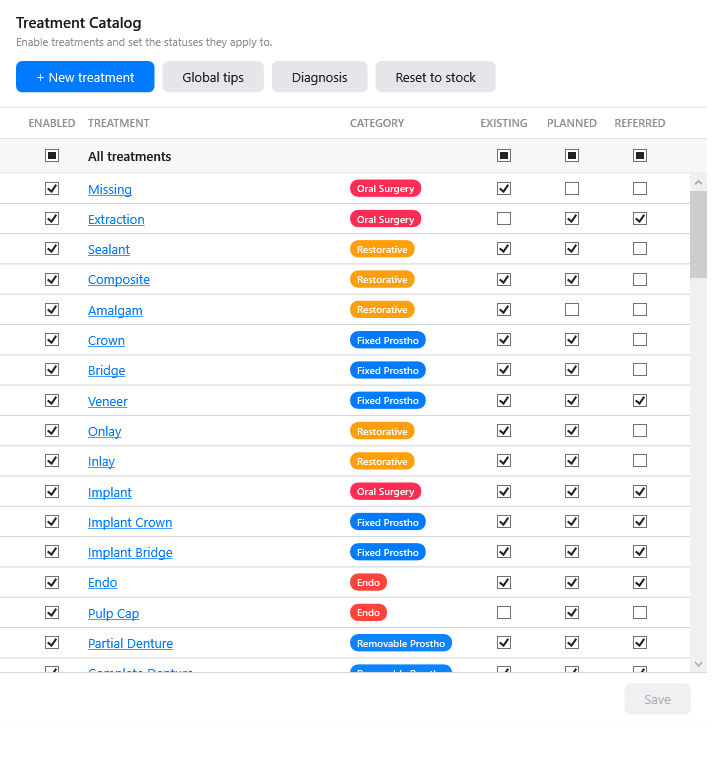
Start with the intuitive stock catalog — it works right out of the box, and you’re free to start customizing any time you want. Your catalog lives in the cloud, versioned: set it up once and every operatory workstation runs the same rules; replace a computer and it comes back exactly as you left it.

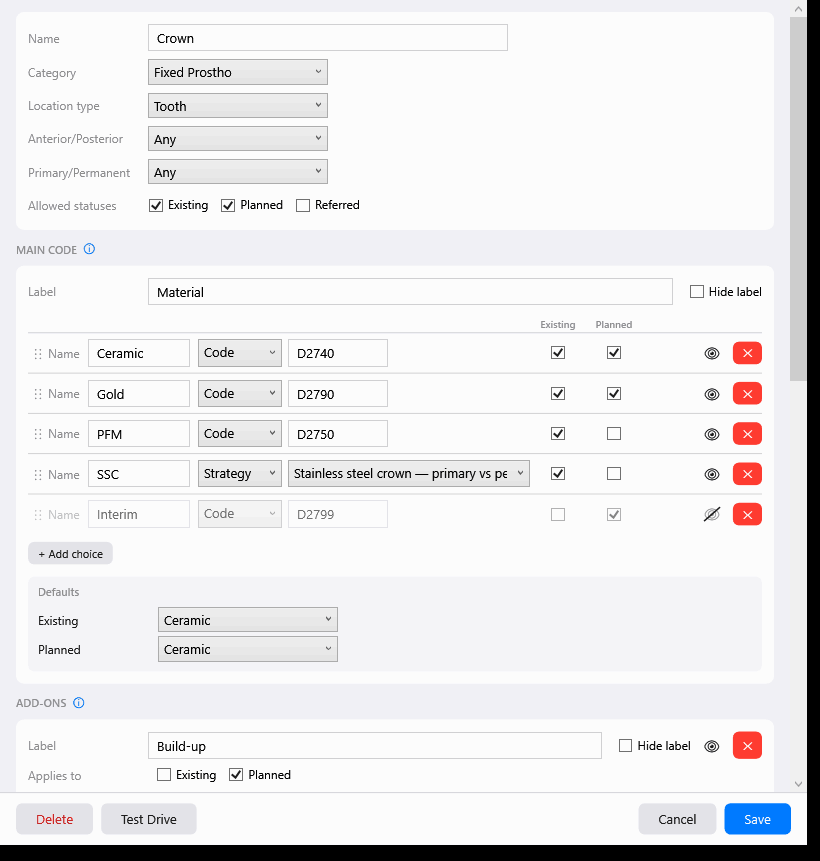
Set your defaults, hide what you don’t use — “crown” means your usual crown material and accessory codes. Never treatment-plan PFMs? Keep them enabled for existing, but off for planned, and you’ll never mistakenly be presented with a planned PFM. Materials and codes your office never uses can be disabled entirely, keeping the agent’s choices simple.

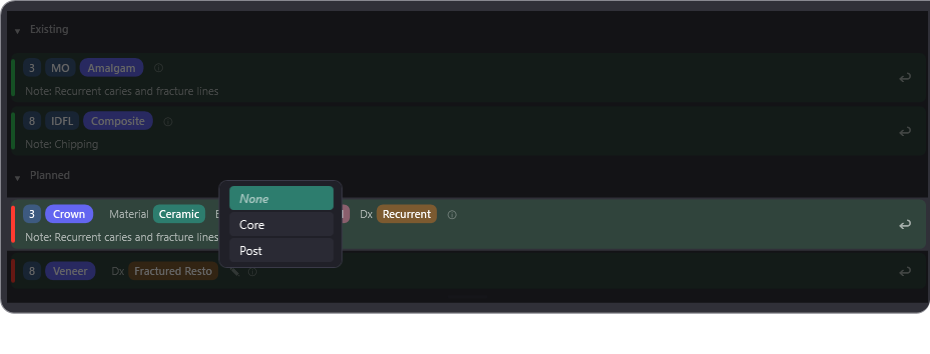
Companion codes ride along — a build-up with a crown, a PA with an extraction. Attach additional codes to any treatment you like, including pickers so you can select whether that was just a build-up or a post and core.

Create new treatment objects — you’re free to expand on the existing treatment objects to create your own. Whether you perform uncommon specialist codes, or want to create an object that bundles several procedures, the power is yours. A Test Drive feature lets you preview your changes before you save.

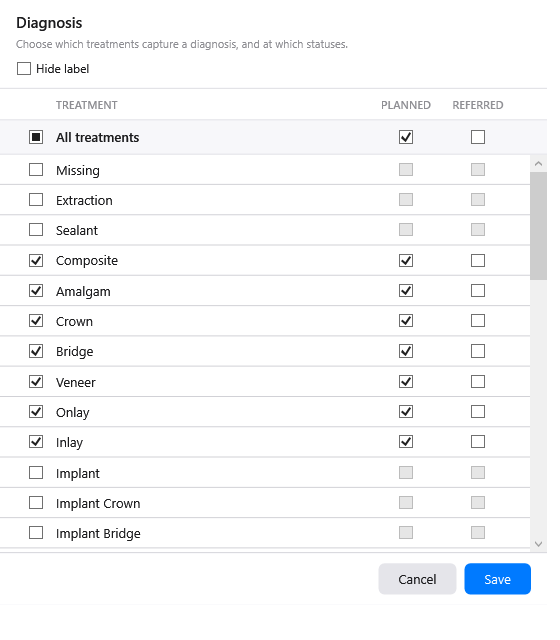
Diagnosis and notes by voice — give the diagnosis for a treatment, or ask for specific notes, and these will ride all the way to Open Dental. Default diagnoses can be set, so all your restorations can be set to caries unless you mention otherwise.

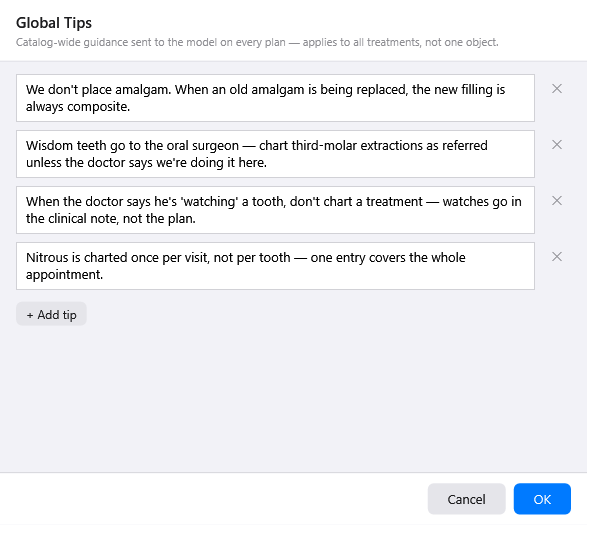
Give it tips for anything a dropdown can’t cover — plain-language guidance, practice-wide or on a single treatment, written in your words: “Wisdom teeth go to the oral surgeon unless the doctor says we’re doing it here.” The things you’d tell a new assistant in their first week, written down once.

The Treatment Catalog — every treatment, its category, and Existing/Planned/Referred availability The Crown treatment opened — Ceramic, Gold, PFM and SSC with their D-codes, per-status availability, defaults and addons The Diagnosis dialog — which treatments capture a diagnosis, at which statuses The Global Tips dialog — practice-wide guidance sent to the model on every plan

The Treatment Catalog — every treatment, its category, and Existing/Planned/Referred availability.

Want to see how powerful and intuitive our catalog customizer is?
Download Dental Scribe for free today and make it yours.

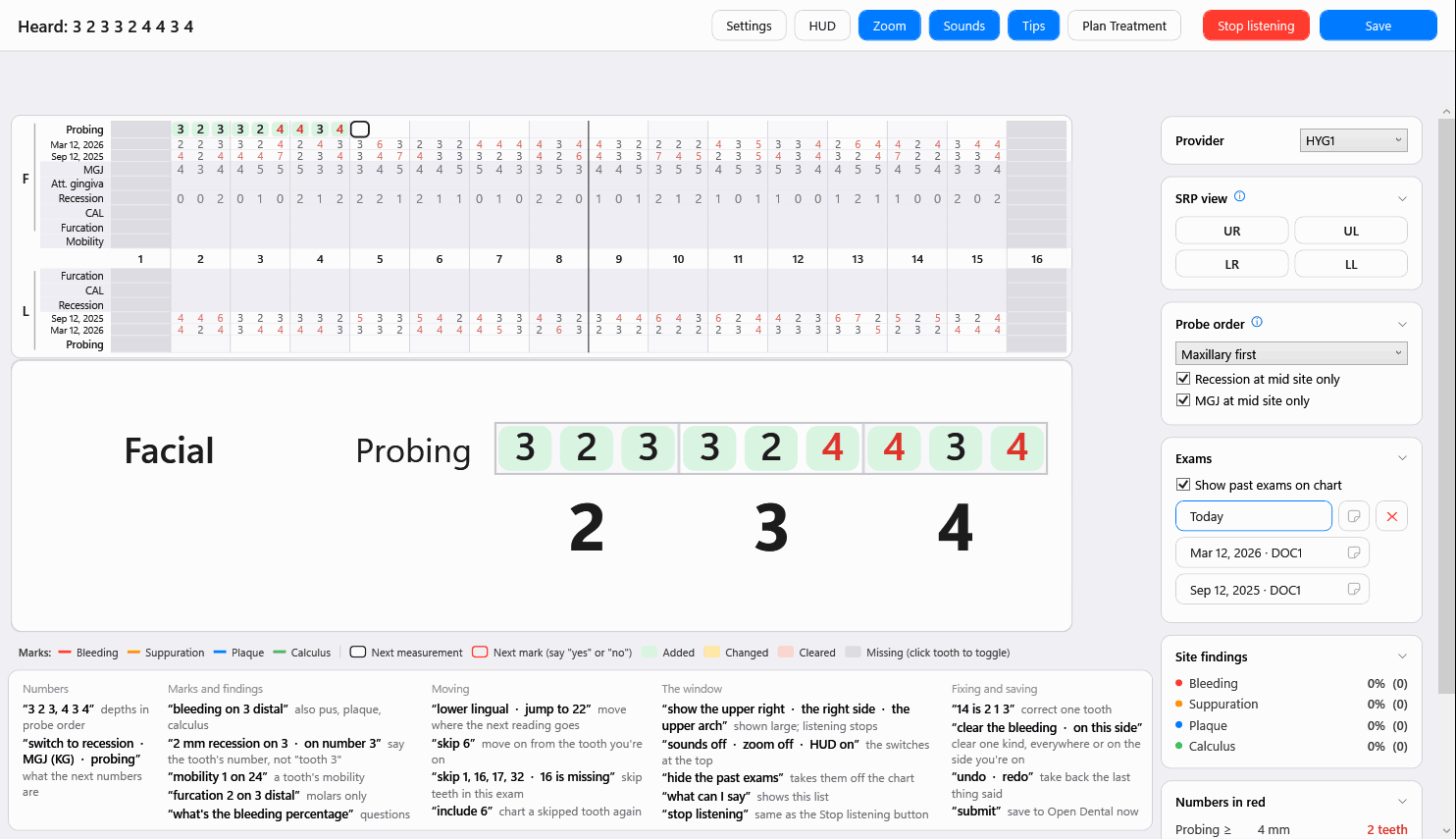
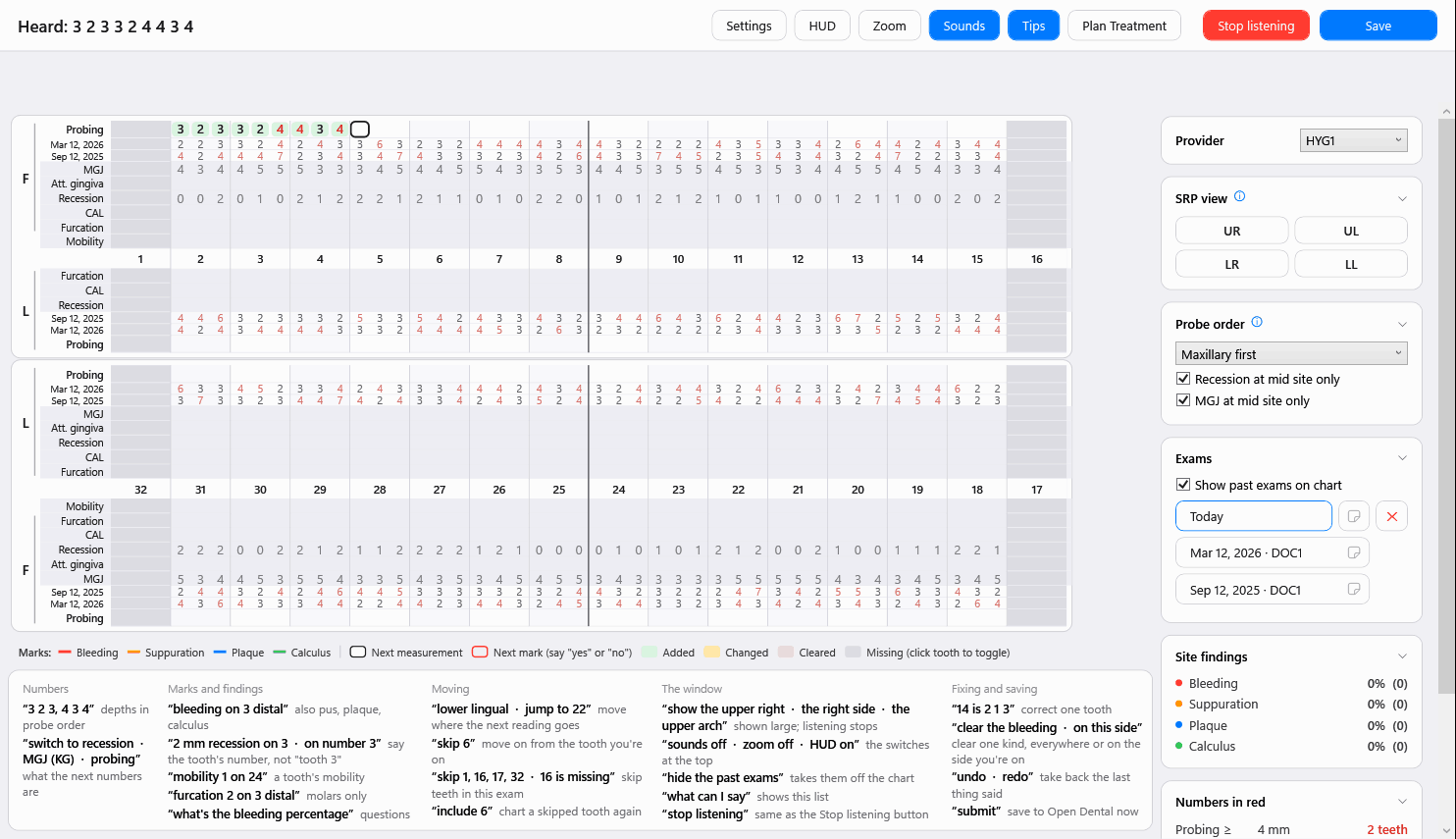
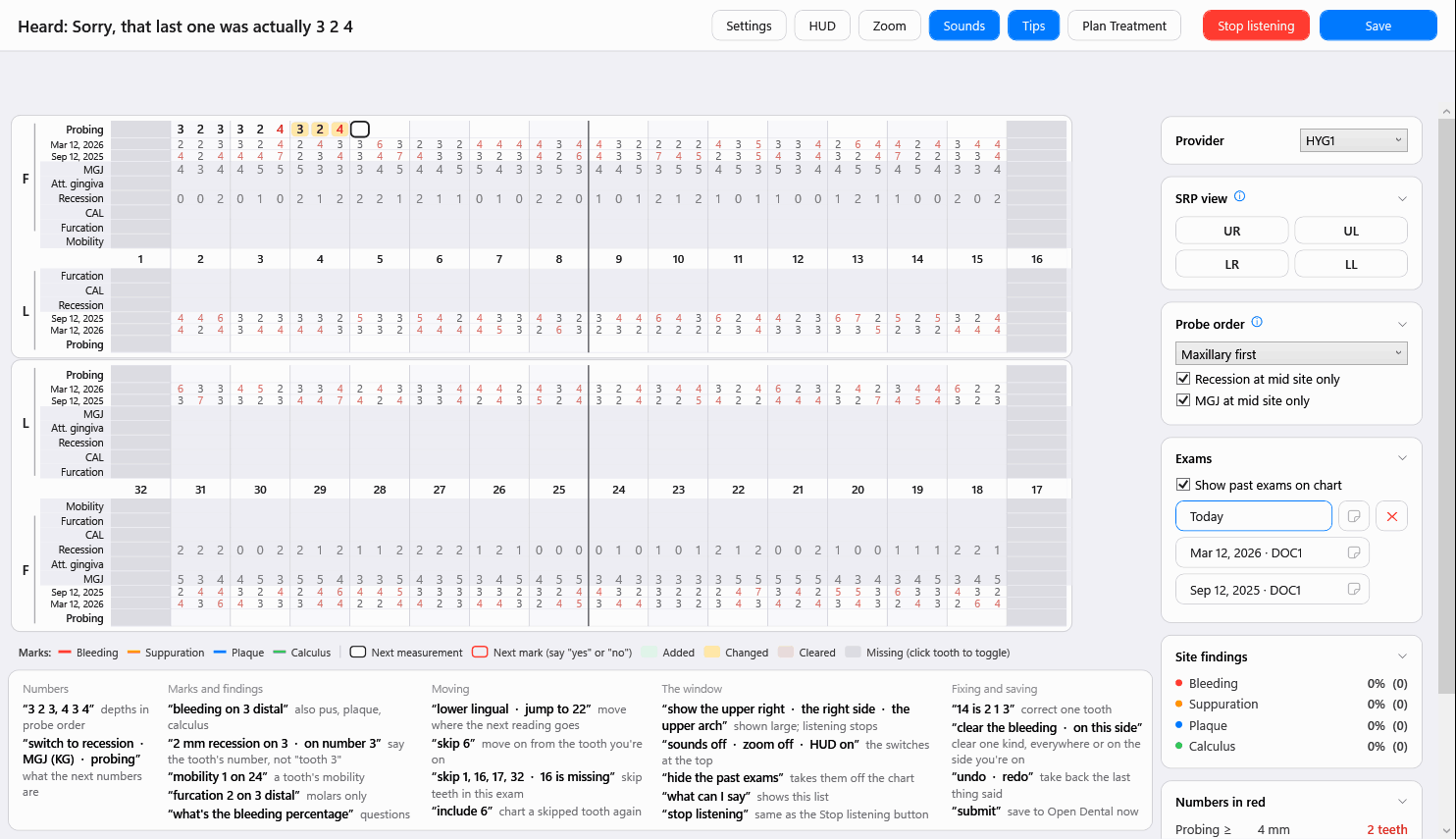
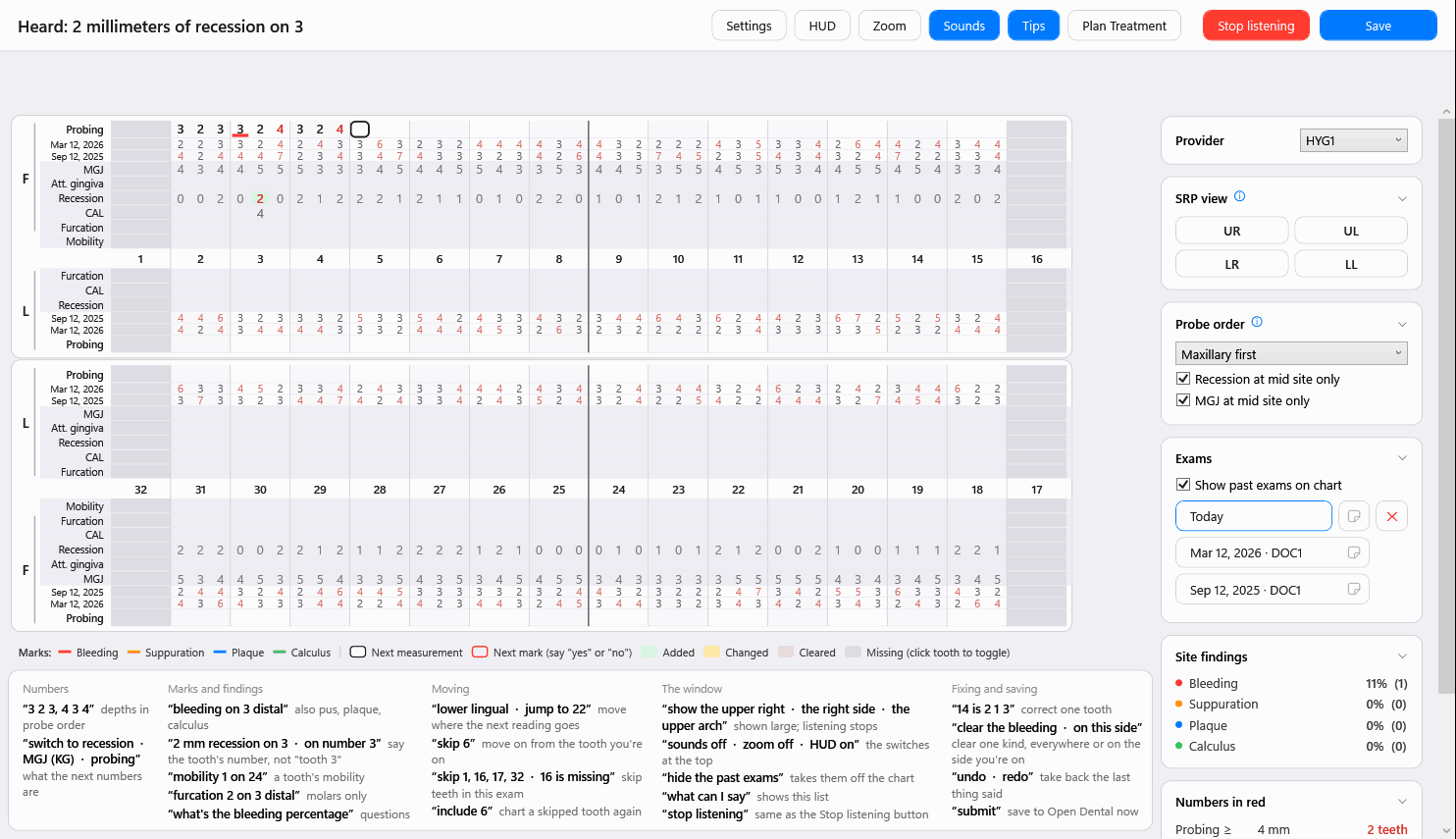
“3 2 3, 3 2 4, 4 3 4”

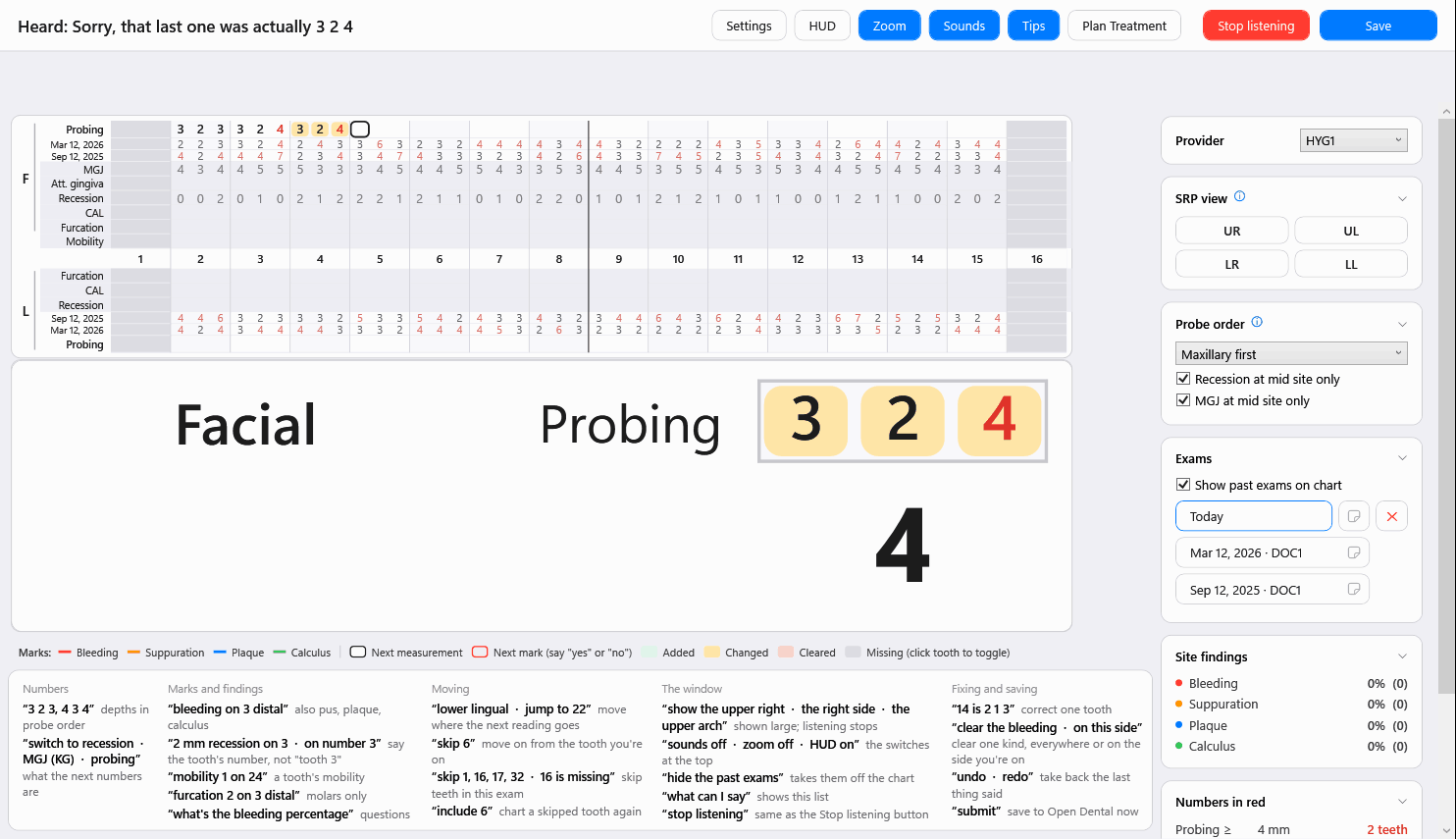
“Sorry, that last one was actually 3 2 4”

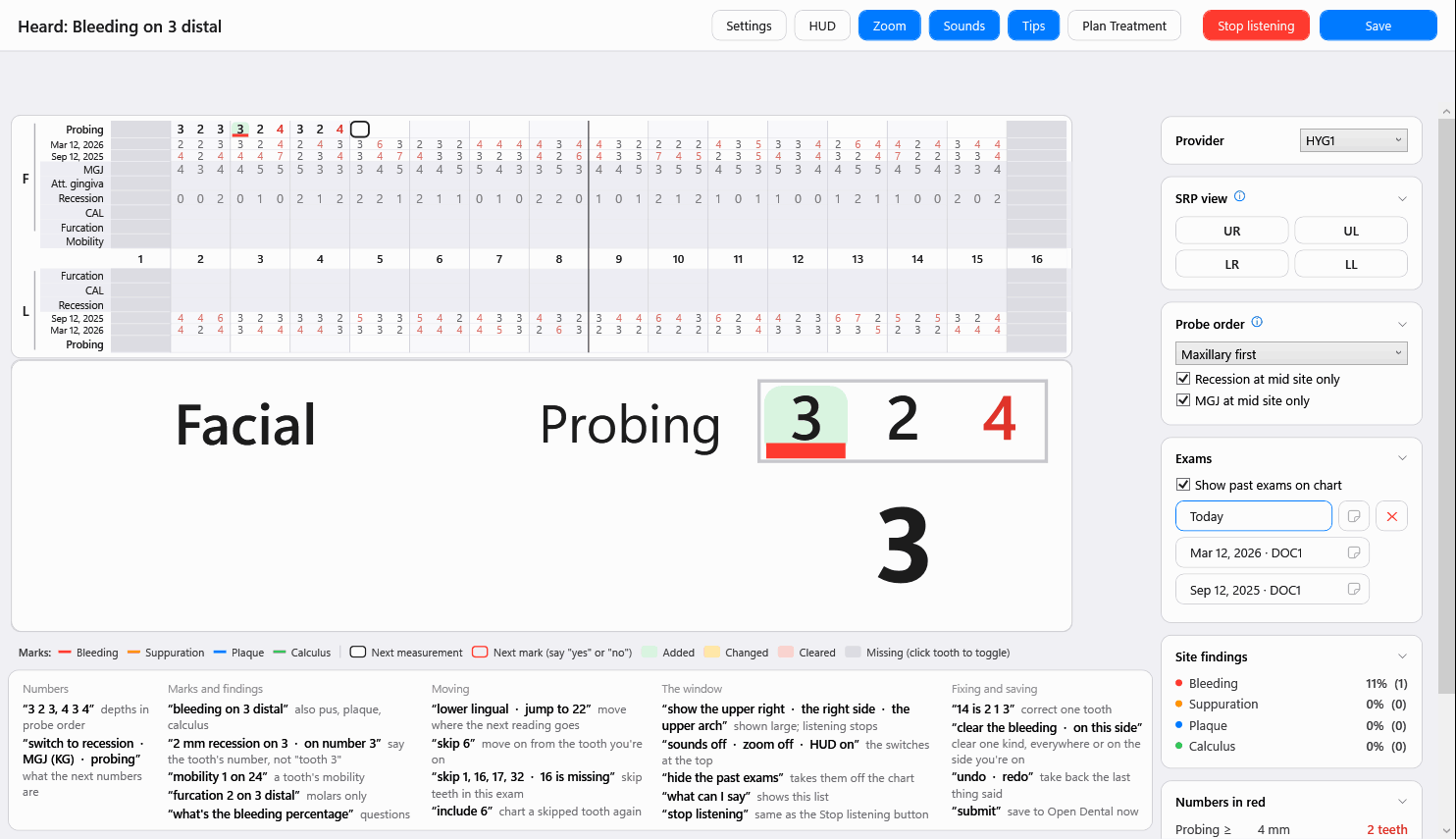
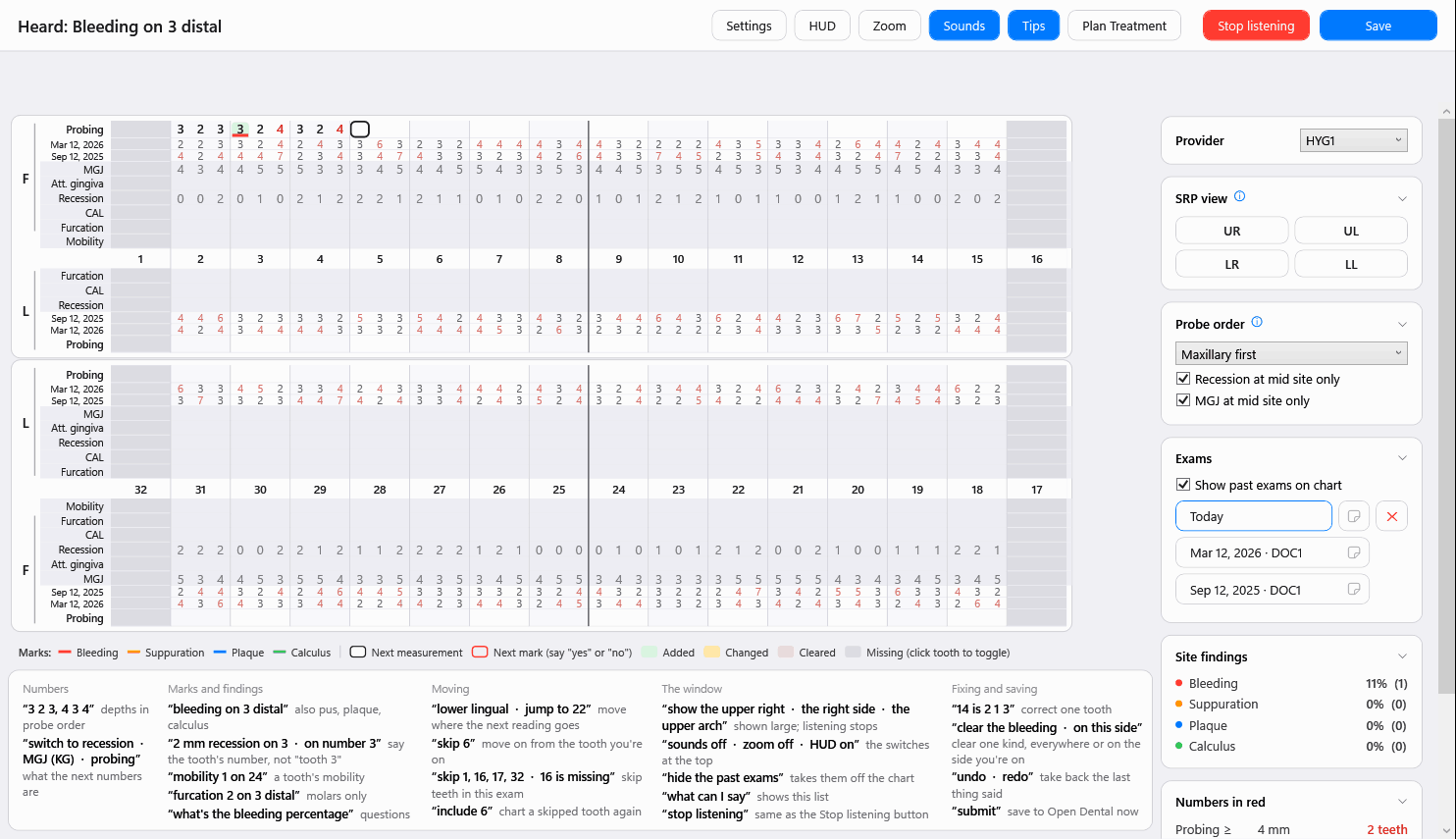
“Bleeding on 3 distal”

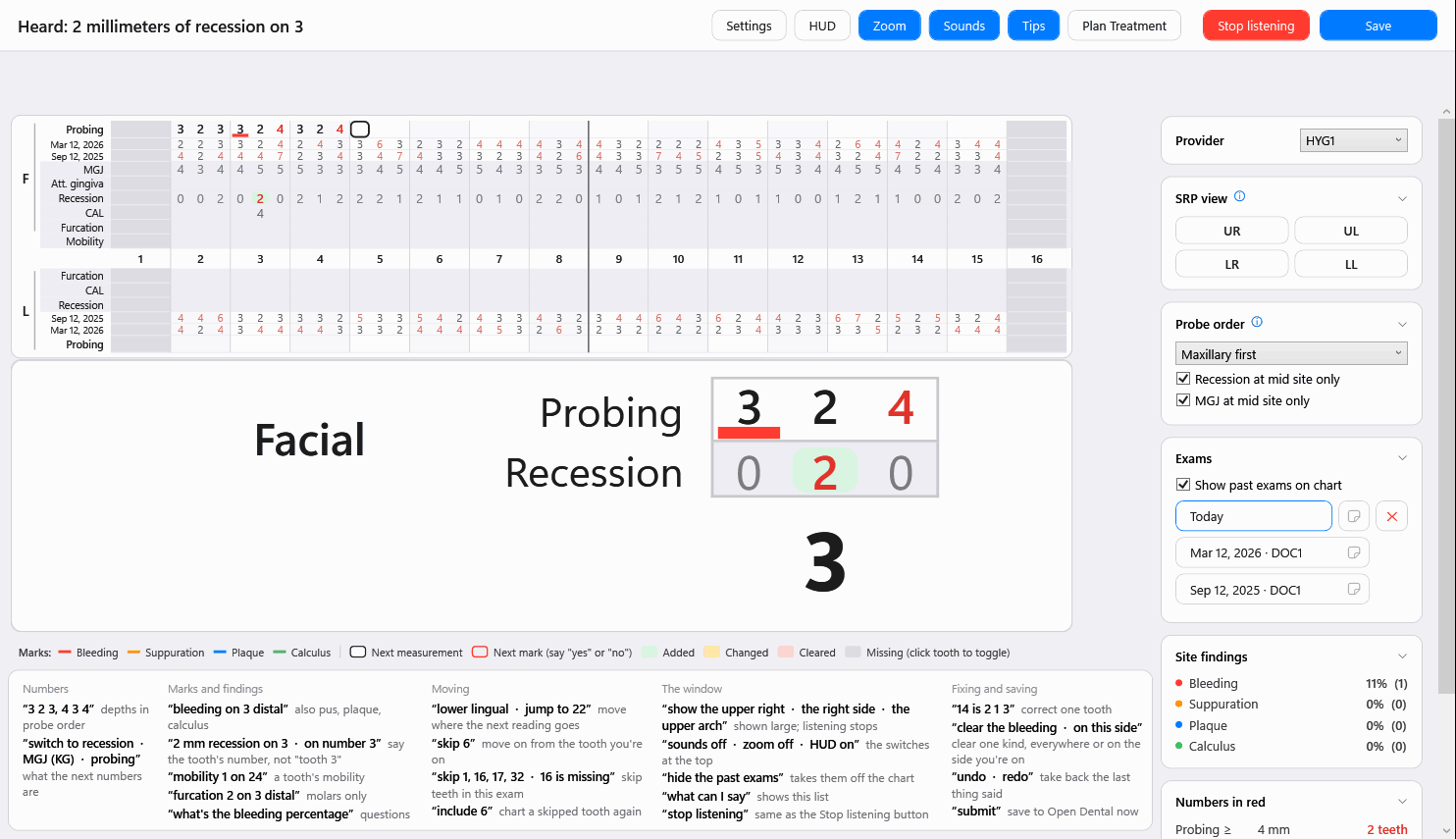
“2 millimeters of recession on 3”

The perio chart after four sentences: teeth 2 to 4's facial depths, tooth 4 corrected, bleeding on tooth 3's distal and a recession of 2 on tooth 3

Voice perio is, at its simplest, data entry. But many solutions use outdated voice recognition, run on yesterday’s AI, or still lock you into fixed commands and force you to say their words, in their order.

Dental Scribe runs on the latest AI models, so you speak naturally and never adapt your workflow to the software. It’s like having someone at the computer entering your readings, only faster. And it costs less: included free with treatment charting, or $49 a month on its own, less than comparable voice perio products.

Better perio, for less.

How perio works

Probe and talk. The perio chart fills itself.

1

Press the DS Perio button in the patient’s chart.

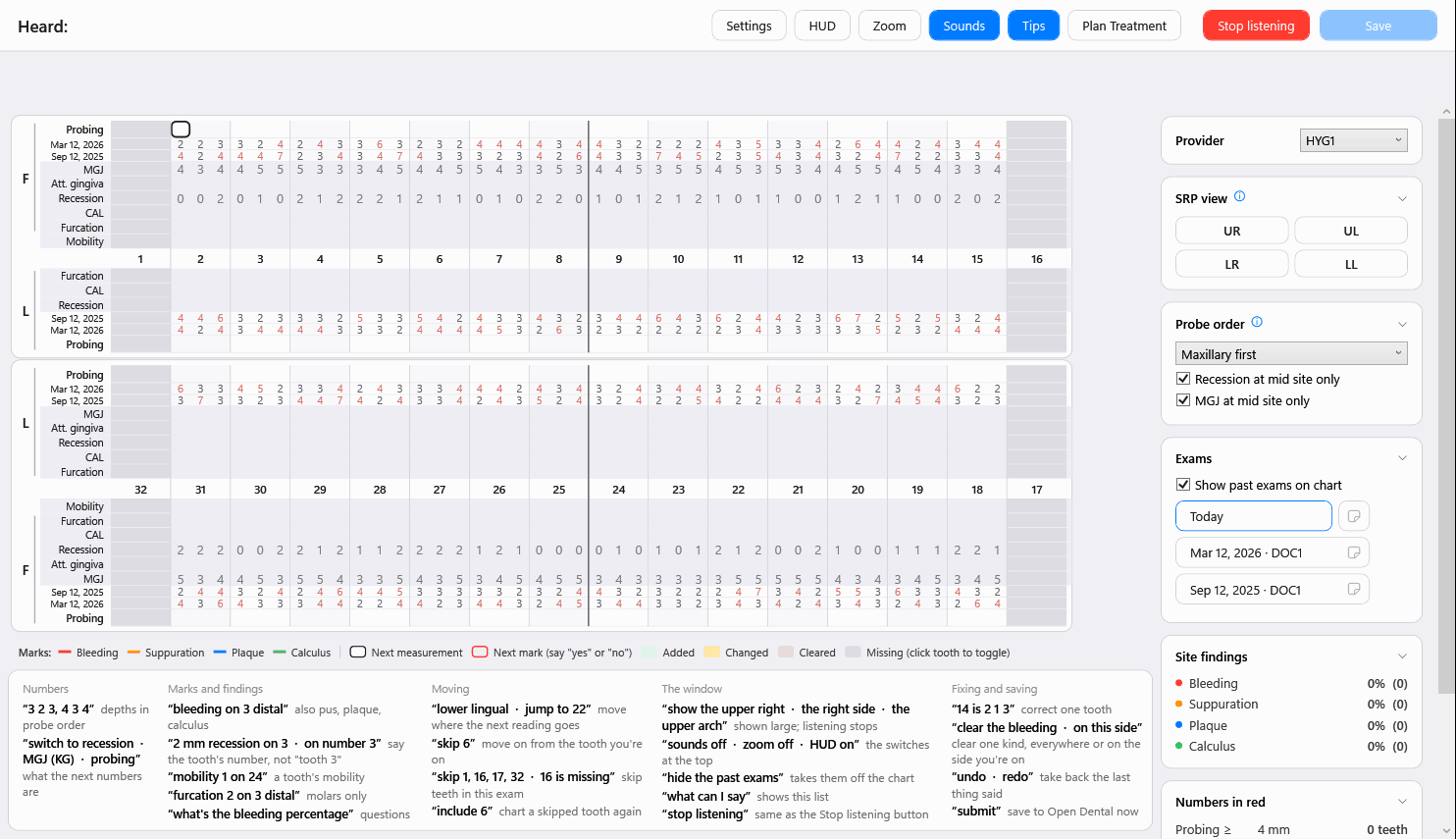
Dental Scribe shows the previous exams and missing teeth, loaded straight from Open Dental, on a simple, easy-to-use chart.

2

Probe and call out the numbers.

Speak probing depths one at a time, tooth by tooth, or include several teeth in one breath: “3 2 3, 4 3 4, bleeding on the distal”. Dental Scribe understands it all, with bleeding, suppuration, plaque and calculus as you go, or in a quick yes-and-no pass afterwards. Include findings like recession, mobility, MGJ and furcation as you go, or after you’ve finished probing.

3

Plan SRP in a few clicks.

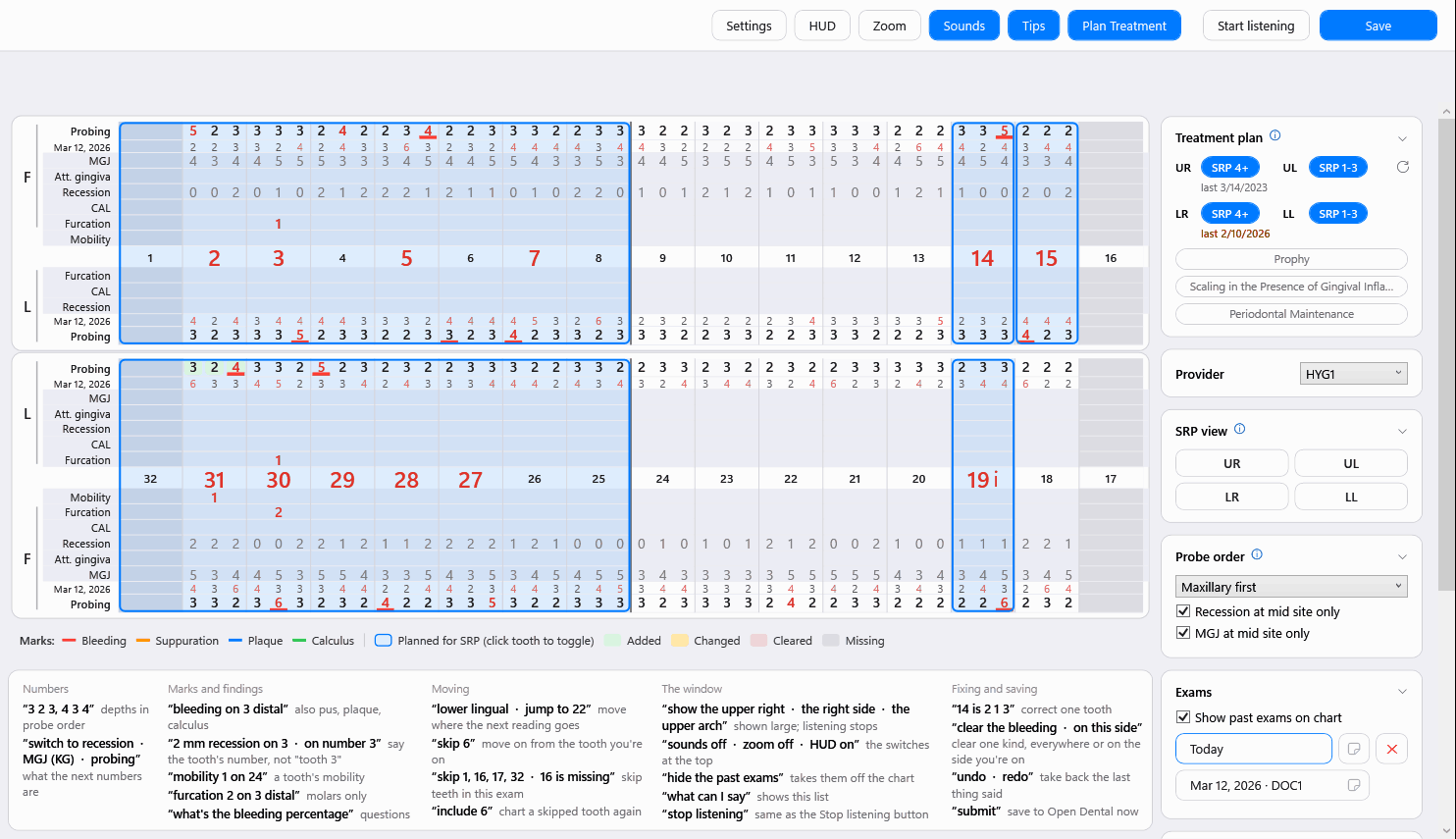
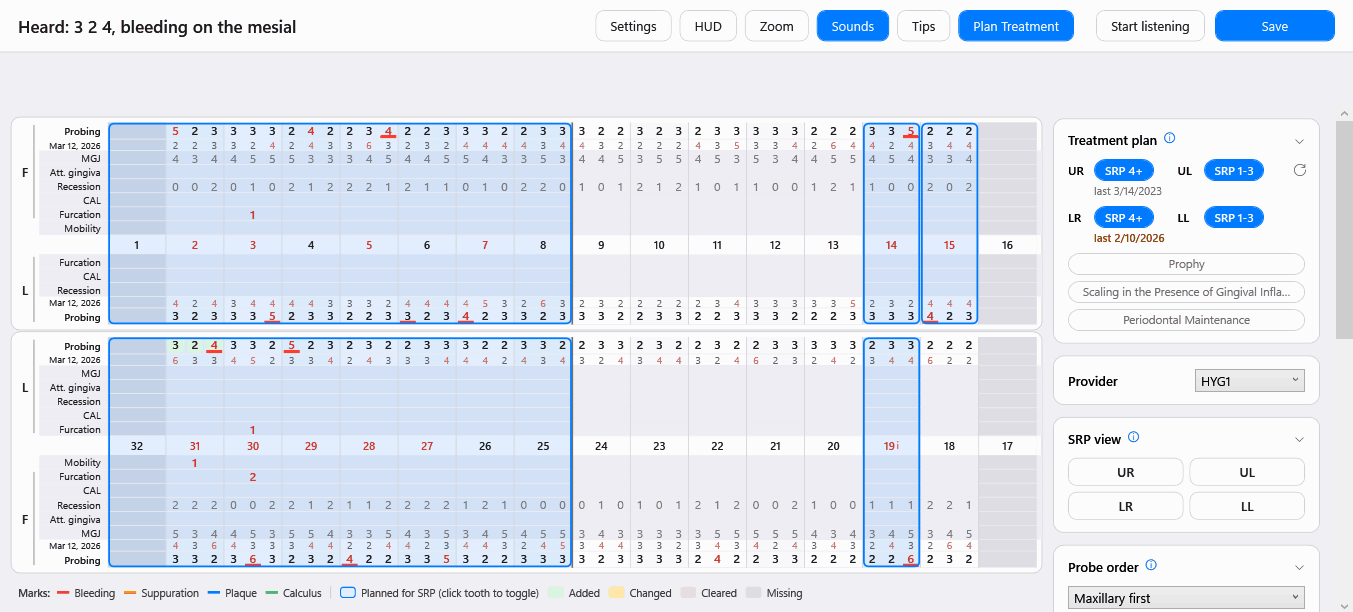
Press Plan Treatment and Dental Scribe auto suggests teeth for SRP per your defaults. Out of the box, that’s any pocket 5 mm or deeper, or 4 mm or deeper with bleeding; change it in Settings. Each quadrant is coded for you: D4341 with four or more teeth selected, D4342 with one to three. Click a tooth or a quadrant to change it, and add a prophy or periodontal maintenance if you need one.

4

Save it into Open Dental.

One click, or just say “save”, and the exam goes into Open Dental’s perio chart, while any SRP codes get added to the main chart.

5

Use SRP view at the SRP visit.

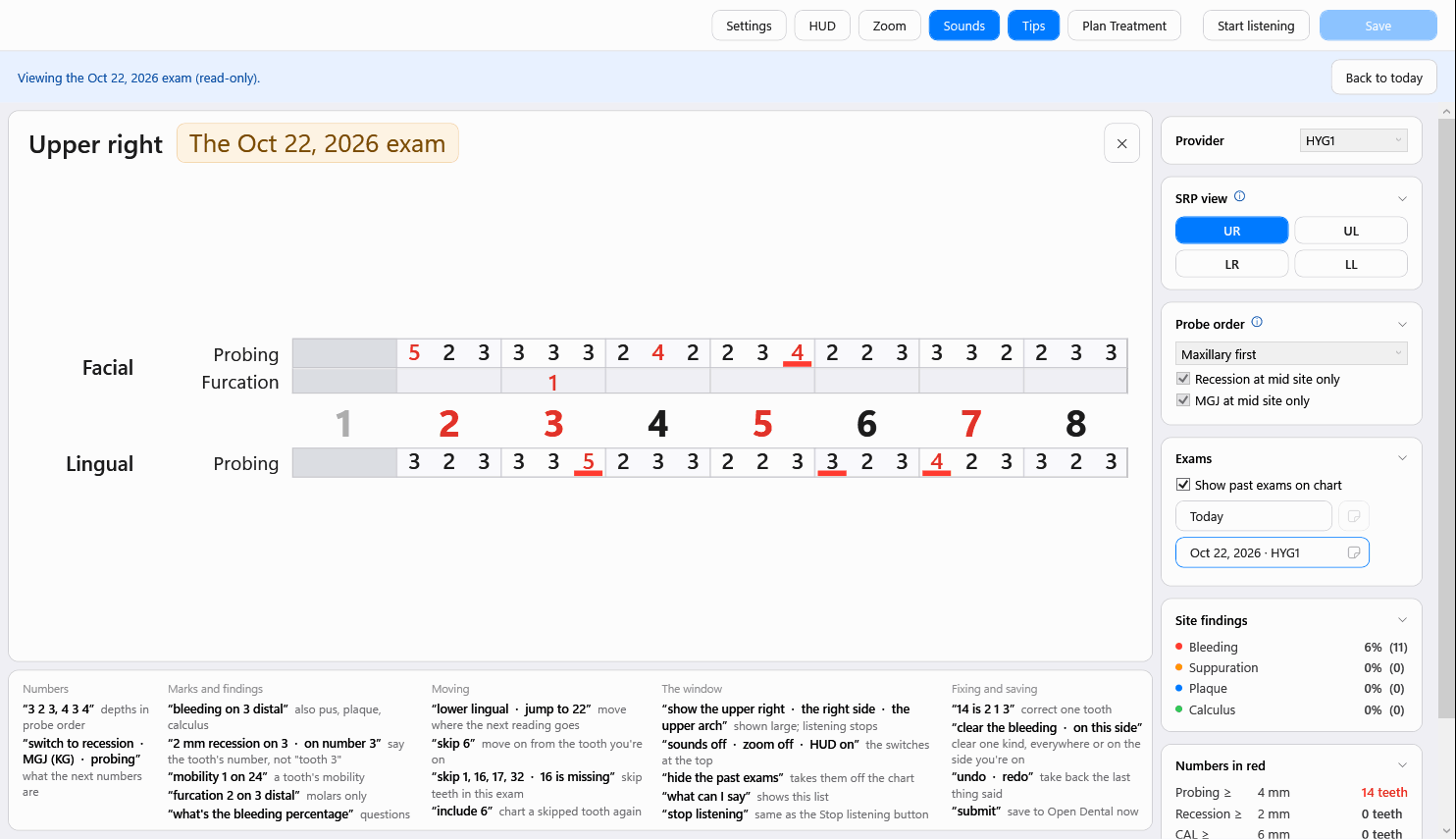
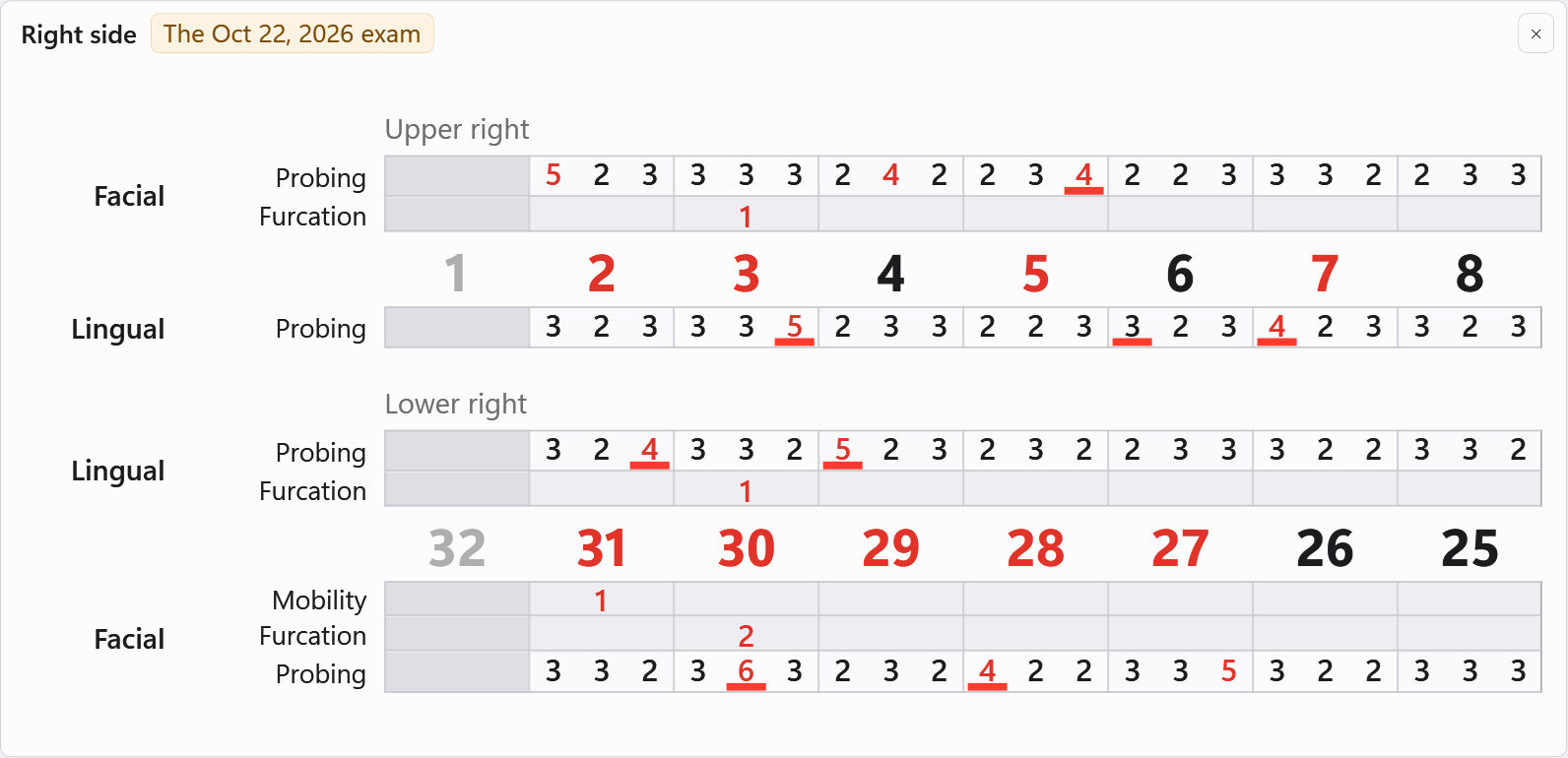
Enlarge a quadrant, an entire side, or an arch, so you can read its depths, bleeding and furcations from where you’re working. One click, or just say “show the upper right”.

The HUD and Zoom

Glance up. Know it heard you.

There’s nothing worse than finishing a row of probings only to find you’re off by one. Dental Scribe is very good at keeping that from happening, but for your peace of mind, we built two ways to keep you in the loop.

Both show the values you just changed, large enough to read from your chair: added in green, changed in yellow, deleted in red. Zoom flashes them over the chart. The HUD is its own window for a second monitor, so you don’t have to crane your neck. Features like these only come from software built by clinicians.

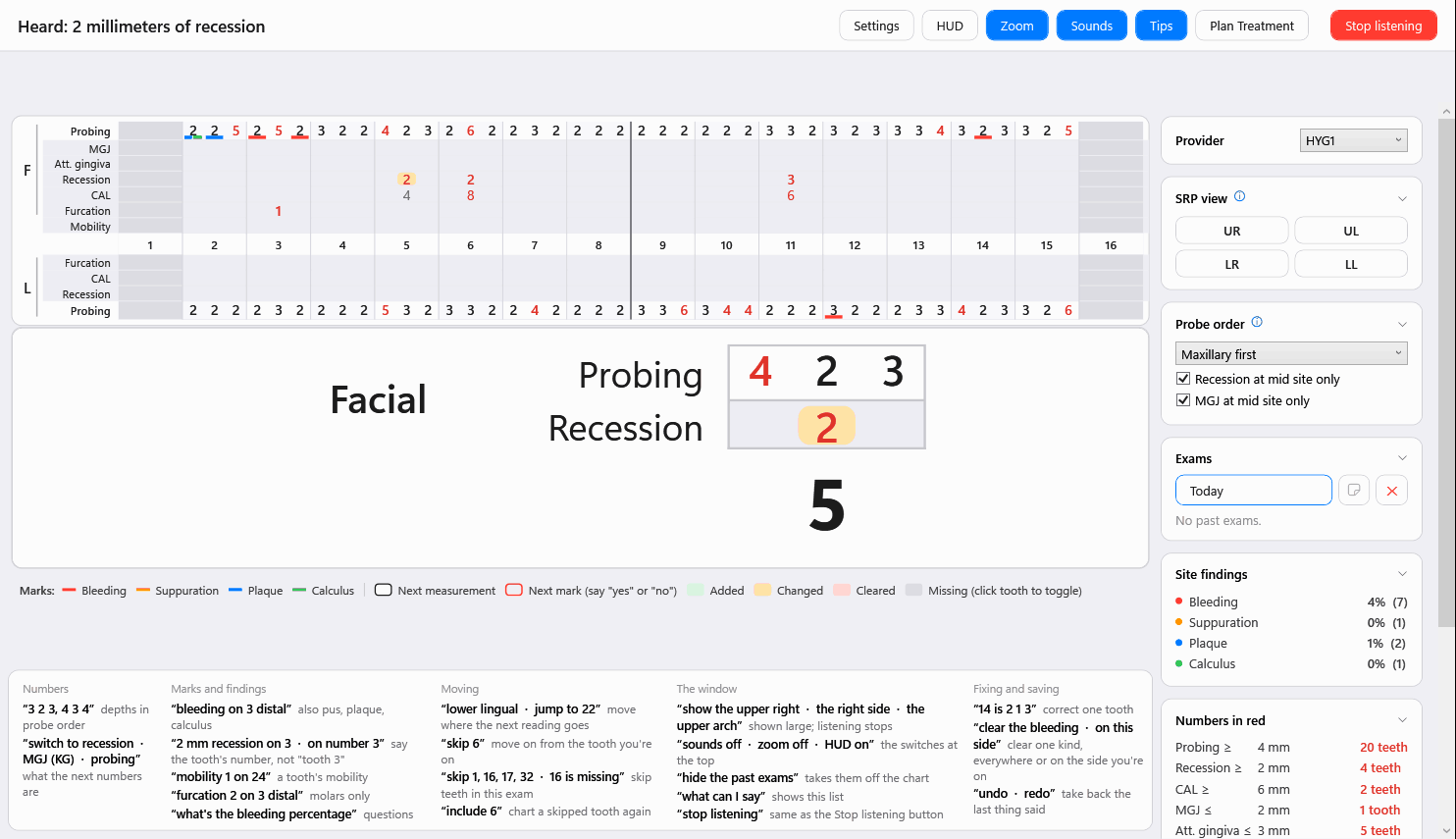
Said: “2 millimeters of recession”

Zoom: the perio window with the last change, a recession of 2 on tooth 5, shown large over the lower arch
Zoom: a momentary flash over the arch you’re not charting, so your work stays in view. Change how long it sticks around in Settings.

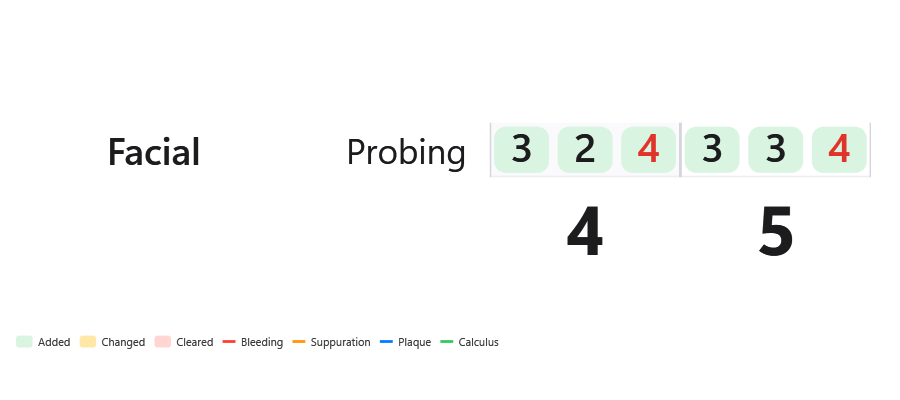
Said: “3 2 4, 3 3 4”

The HUD: the probing just said for teeth 4 and 5, in large type
HUD: its own window you can place on a second monitor. Each operatory remembers its location between patients.

Plan Treatment and SRP view

From the numbers to the treatment plan, in a few clicks.

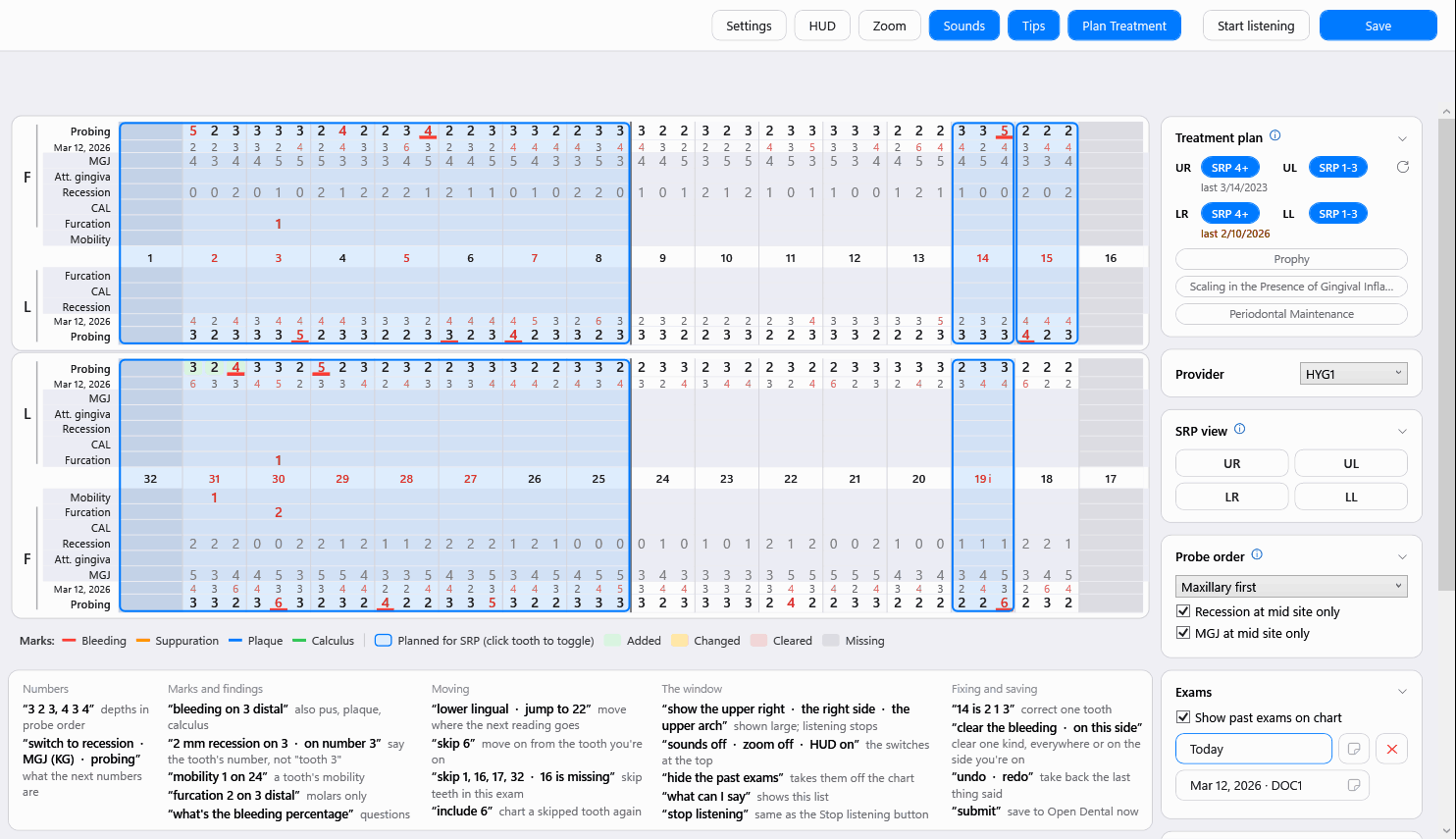
Plan Treatment: the perio chart with the upper right and lower right quadrants outlined in blue for SRP 4+, teeth 14, 15 and 19 outlined for SRP 1-3, the teeth that met the rule with red numbers, and a Treatment plan card with each quadrant's button, when SRP was last done there, and buttons for a prophy, scaling in the presence of gingival inflammation, and periodontal maintenance
Plan Treatment: what’s planned is outlined in blue, and a red tooth number shows that tooth met your rule, so you can see why a quadrant was planned. Each quadrant shows the last SRP date from Open Dental, in amber if that’s inside the frequency limit on the patient’s insurance plan (24 months if Open Dental has none).
SRP view: the right side of the mouth shown large, the upper right and lower right quadrants with their probing depths, bleeding, furcation and mobility in big type
SRP view: the quadrant you’re working on, large.

What perio does

Hear it without looking up — a short sound after each thing you say tells you you’re on track. A high tick means it’s done: for probing, it caught all three measurements and finished the tooth. A lower tick means it stopped partway through one. A chime marks the midline and the end of each side, and two falling notes mean something needs your attention. No sound means nothing was done. Turn them down or off any time.

Previous exams, just like Open Dental — missing teeth and earlier exam values come straight from Open Dental, on an easy-to-read chart. Previous recession, MGJ, mobility and furcation show up as grayed values until you update them with today’s measurement. Bleeding percentages and teeth past your Open Dental red lines update as you chart.

No workflow to lock you in — record recession, MGJ, furcation or mobility as you go, or probe everything first and come back for recession. Note missing teeth by voice, skip ahead to another tooth, or go back to one you’ve passed. It’s exactly like having an assistant at the keyboard.

Saved into Open Dental — one click, or just say “save” or “submit”, and the exam goes into Open Dental’s Perio Chart through Open Dental’s own API. Nothing to type in afterwards. No janky automation to wait through.

Your probing order — maxillary first, facials first, or your own custom order. Hygienists who share a computer can each have their own: Dental Scribe remembers each provider’s order from their last saved exam.

Hands-free controls — “zoom off”, “sounds off”, “show the upper right”. Your gloves stay off the mouse. Not sure what to say? Tips under the chart list it all, or just ask “what can I say”.

Correct it like you’d correct an assistant — “Sorry, that last one was actually 2 1 3”, or “number 3 distal is a 5”. Or click any number and type over it.

One price, every operatory — $49 a month per office, no per-seat math. Want treatment charting too? The full plan at $149 includes perio.

On the roadmap — advanced perio analysis, visualization, classification, and patient education printouts.

Why it works

Three parties, each doing what they do best.

The frontier labs make the intelligence.

Dental Scribe runs on the latest models from the leading AI labs — the same intelligence behind the best AI products in the world. It’s excellent today and quietly better every release, with nothing to upgrade on your end. You’re not betting on a small dental company’s ability to build AI.

A dentist built the software around it.

Even the best AI doesn’t know what a build-up is, which codes ride with the crown, or how to write a procedure into Open Dental. Nor do tech startups know how to build a treatment catalog system that can be customized to fit your flow. Dental software this good requires a dentist to build it.

You configure it like you’d onboard an assistant.

Lock in your defaults, enable the treatments you do, hide the ones you don’t. Set the global and treatment tips to add the nuance. A new assistant learns your office in a few weeks; Dental Scribe is locked in much quicker, and never forgets.

Nothing important is left to guess.

The structured layer is deterministic — materials, addons, extra codes and per-status defaults resolve the same way every time, by rule, not judgement. What you set is what gets written; the intelligence is there to translate what you said into what Open Dental needs.

Patient data doesn’t come to us.

No patient health information reaches Soulware servers: no audio, transcripts, patient names or chart content. Audio goes straight from your computer to our AI providers, and your chart is built on your machine. Even your Open Dental API key is deleted from our servers once your computers have it. We sign a BAA with your office, and every AI provider we use works under one with us: audio is never saved, and nothing is used for training. See who handles what.

Built with craftsmanship.

Dental Scribe is built by a small team led by a practicing dentist, not a sprawling organization passing overhead to you and beholden to venture capital. This means our code is built with craftsmanship, our fixes are faster, and our pricing reflects a lean, agile company — not an enterprise one with layers of overhead baked into the price.

Pricing

Perio

$49/mo per office

Voice perio charting and SRP planning, saved into Open Dental.

Charting and perio

$149/mo per office

Everything: treatment charting into Open Dental, with perio included.

No per-seat math, no contracts, no “contact sales for a demo.”

Getting started

Try it out now. No approval needed, no onboarding call to schedule.

1

Download it. Windows, one installer, a couple of minutes.

2

Make a free account. Email and a password. No card.

3

Start dictating. Trial minutes are included. Open a chart and talk — you’ll sense in minutes just how powerful Dental Scribe is, and what makes it different.

4

Open the catalog and make it yours. Explore the customizer to see how you can make what’s already good, great. This is the part that tells you whether it fits your office.

5

Subscribe when it’s a fit. Perio at $49 a month, or charting and perio at $149.

Download

Questions

Does Dental Scribe work with Open Dental?

Yes. It’s built for Open Dental: it opens from a button at the top of the patient’s chart and writes through Open Dental’s own API.

What does it cost?

$149 a month per office for treatment and perio charting, with unlimited providers, or $49 a month per office for perio alone. The trial is free, with no card.

What microphone should we use?

For perio charting, we suggest the Hollyland Lark A1, a wireless lapel mic. For treatment charting, we suggest an ambient microphone in the operatory.

Does patient data reach Soulware’s servers?

No patient health information reaches Soulware servers. Audio goes straight from your computer to our AI providers, and your chart is built on your machine. We sign a BAA with your office.

Who built it?

A practicing dentist. Dental Scribe is a product of Soulware Studio LLC.